Coach & Trainer Kit · 6 tools · one-time payment
Sell your coaching online, from first sign-up to payment
The Coach & Trainer Kit brings together 6 online tools to attract sign-ups with a free resource, follow up by email, present your offer in a webinar, sell it on your page and funnel, and prove your results with genuine reviews.
You build the whole path that takes a stranger to your offer, with pages and emails you own: no platform subscription, no commission on your sales, and safeguards against fake urgency and fake testimonials.
- The 6 tools in the order you use them
- Every tool can be tried free, no account needed
- 30-day money-back guarantee
Is the Coach & Trainer Kit right for you?
Who is it for?
- You are a coach, trainer or consultant and want to sell coaching, a programme or a course online.
- You have expertise but no mailing list yet, or a list you don't use.
- You want your own pages and emails rather than a monthly subscription to an all-in-one platform.
- You want to sell honestly: real testimonials, a real deadline or no deadline at all.
Not for you if…
- You want a platform that hosts your course videos, manages student access and takes payments for you: the funnel produces HTML pages that you host, payment goes through your own provider (Stripe, PayPal, SumUp…) and emails through your own email tool.
- You first need to write your ebook or course modules: that is what Ebook & Course Studio is for, and it is not in this kit.
- You are counting on a permanent countdown timer or made-up reviews: the tools flag these practices, which are prohibited.
How do you sell coaching online? Your 6-step process
The steps follow your future client's journey: they discover your free resource, receive your emails, attend your webinar, read your sales page, buy, then leave a testimonial.
-
Lead Magnet StudioStandard
Step 1: Attract sign-ups with a useful free resource
- You get
- A free resource ready to download (checklist, guide, template, mini email course…), its sign-up page with compliant consent, and the delivery and follow-up emails.
- You enter
- The format, the promise, your audience, the specific problem you solve and how it links to your paid offer.
See an example User guide Try the tool →
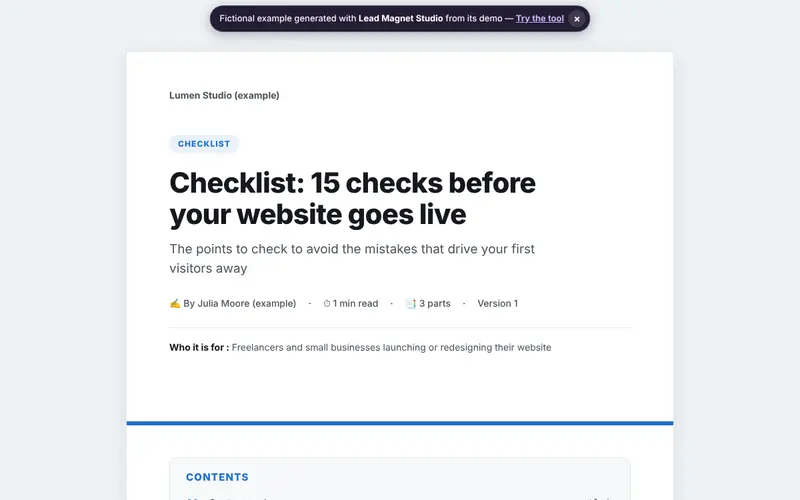
Example generated with Lead Magnet Studio (fictional data) · See the full example Practical guide: Lead magnet : idées, exemples et règles RGPD pour collecter des emails (in French)
-
Email Sequence StudioEssential
Step 2: Welcome your sign-ups by email
- You get
- A sequence of automated emails (welcome, webinar invitation, launch…) with subject lines, preheaders and delays, a deliverability check and exports for Mailchimp, Brevo, Kit or Klaviyo.
- You enter
- The type of sequence, your offer, the tone of your emails and how many emails you want.
See an example User guide Try the tool →
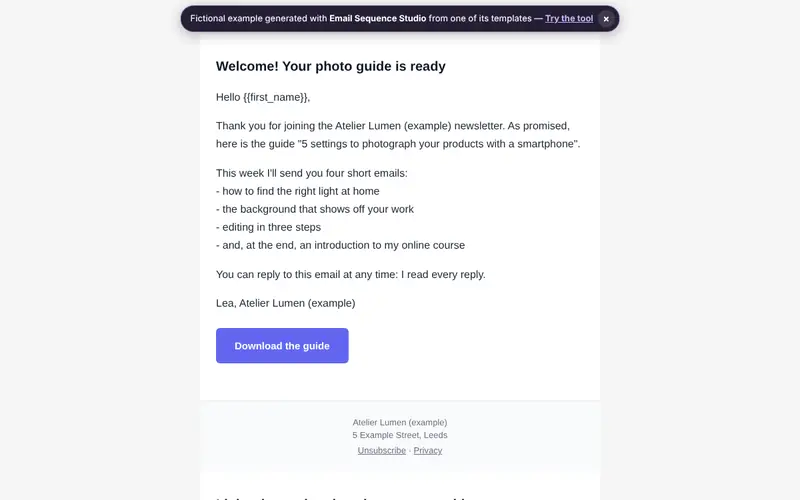
Example generated with Email Sequence Studio (fictional data) · See the full example Practical guide: Email de bienvenue : la séquence en 5 emails (in French)
-
Webinar StudioStandard
Step 3: Present your method in a webinar
- You get
- The timed script of your webinar, block by block, a teleprompter with a timer for the live session, chat messages, answers to objections, and invitation, reminder and replay emails.
- You enter
- Your topic, the format (masterclass, Q&A, launch…), the length and the offer you present at the end.
See an example User guide Try the tool →
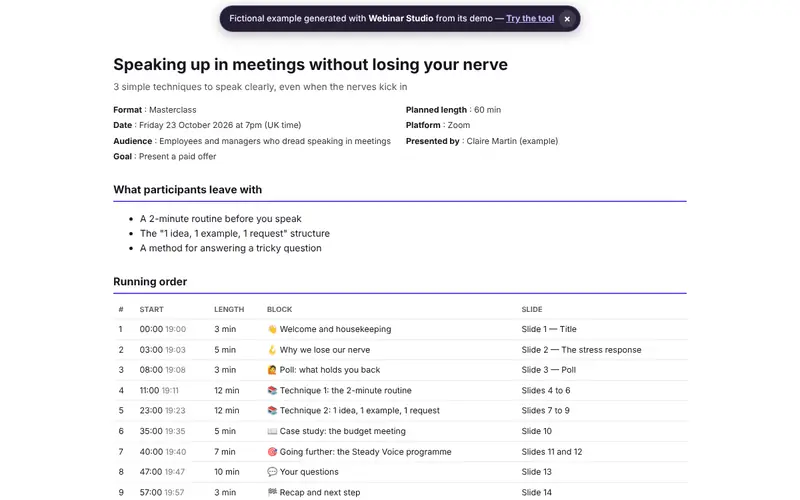
Example generated with Webinar Studio (fictional data) · See the full example Practical guide: Prix barrés et promotions : les règles depuis la directive Omnibus (in French)
-
Landing Page Copy StudioEssential
Step 4: Write the sales page for your coaching
- You get
- The copy for every block of your sales page (headline, benefits, proof, FAQ, call to action), a live preview and a copywriting score, with HTML, WordPress or Webflow export.
- You enter
- Your offer, your ideal client, what sets you apart and the angle you choose.
See an example User guide Try the tool →
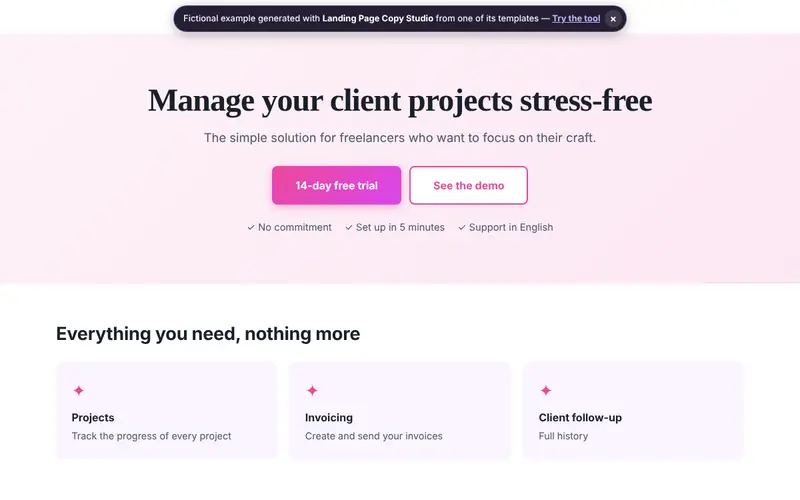
Example generated with Landing Page Copy Studio (fictional data) · See the full example -
Funnel StudioAdvanced
Step 5: Put your sales funnel online
- You get
- The linked pages of your funnel (sign-up, sales, checkout with terms of sale and right of withdrawal, thank-you, legal notice) as HTML files ready to publish, connected to your email tool and your payment provider.
- You enter
- Your offer and its price, your payment provider, your email tool and your legal details.
See an example User guide Try the tool →
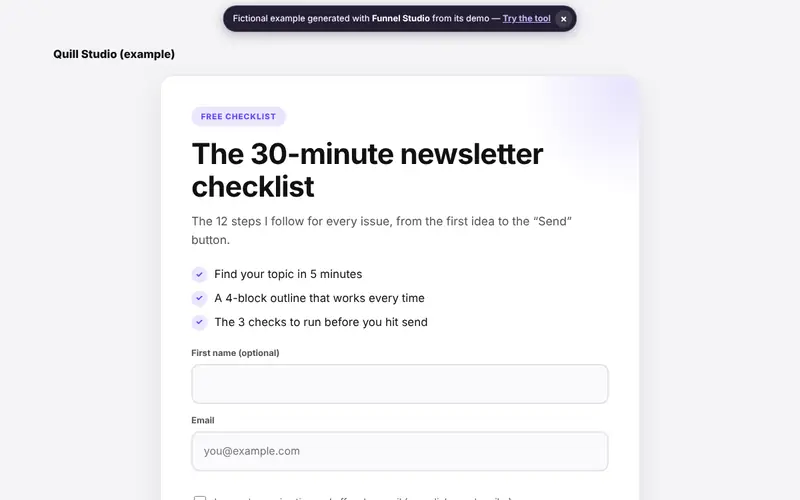
Example generated with Funnel Studio (fictional data) · See the full example Practical guides: Mentions légales d’un site web : Belgique et France (in French) · Prix barrés et promotions : les règles depuis la directive Omnibus (in French)
-
Reviews & Case Study StudioStandard
Step 6: Show genuine results
- You get
- Testimonials collected with your clients' consent, case studies with dated and sourced results, and a reviews page with the mandatory information, to reuse on your sales page.
- You enter
- Your clients' feedback and their consent, and for each case study the situation before, after, the period and the source of the figures.
Practical guide: Avis clients : ce qui est interdit, et comment en obtenir de vrais (in French)
What can you do for free before buying?
Every tool opens straight away, with no account or credit card. What you can do for free depends on its level:
-
Lead Magnet Studio Standard
The whole editor, preview, demo, 5-axis score and 3 recommendations, 1 project, exports with a “Discovery version” watermark; Pro removes the watermark and adds AI, templates, data import / export and more projects.
Try it free → -
Email Sequence Studio Essential
The whole tool and all its exports (with a small “Made with Yok-Kod” mention), demo, 5-axis score and 3 recommendations, 1 project; Pro removes the mention and adds AI, templates, more projects and every recommendation.
Try it free → -
Webinar Studio Standard
The whole editor, preview, demo, 5-axis score and 3 recommendations, 1 project, exports with a “Discovery version” watermark; Pro removes the watermark and adds AI, templates, data import / export and more projects.
Try it free → -
Landing Page Copy Studio Essential
The whole tool and all its exports (with a small “Made with Yok-Kod” mention), demo, 5-axis score and 3 recommendations, 1 project; Pro removes the mention and adds AI, templates, more projects and every recommendation.
Try it free → -
Funnel Studio Advanced
The whole editor, demo, 5-axis score and 3 recommendations, 1 project, preview of about a third of the document; Pro unlocks the full document, exports, templates, AI and more projects.
Try it free → -
Reviews & Case Study Studio Standard
The whole editor, preview, demo, 5-axis score and 3 recommendations, 1 project, exports with a “Discovery version” watermark; Pro removes the watermark and adds AI, templates, data import / export and more projects.
Try it free →
Good to know: GDPR, struck-through prices and reviews
Free resource: ask for consent separately
The safest approach is to deliver your free resource to everyone and ask for consent to marketing emails with a separate box that is never pre-ticked. Every email must say who sends it and offer a simple way to unsubscribe.
Read: Lead magnet : idées, exemples et règles RGPD pour collecter des emails (in French) · Email de bienvenue : la séquence en 5 emails (in French)
Struck-through prices and deadlines
A struck-through price must be the lowest price you charged in the 30 days before the reduction, in Belgium and France alike. Any deadline you announce must be real: a countdown that restarts on every visit is a misleading practice.
Read: Prix barrés et promotions : les règles depuis la directive Omnibus (in French)
Customer reviews: genuine and verified
Writing, buying or altering reviews is prohibited throughout the European Union. If you display reviews, explain whether and how you check that they come from real customers, and don't hide negative ones.
Read: Avis clients : ce qui est interdit, et comment en obtenir de vrais (in French)
General information, up to date on the date of this page; it does not replace professional advice.
What the Coach & Trainer Kit does not do
- It does not replace an accountant, a lawyer or a notary: the documents you produce are solid working drafts, to be reviewed and validated when the stakes call for it.
- It does not force AI on you: the tools work without it. AI is optional, with your own key from the provider of your choice, who bills you directly.
- It does not host your pages or videos, send your emails or take your payments: you keep your files and use your own services (web host, email tool, payment provider).
- It does not invent testimonials or figures: the proof comes from your real clients, with their consent.
Frequently asked questions about the Coach & Trainer Kit
Yes. The funnel builds the checkout with acceptance of your terms of sale and the appropriate right of withdrawal (waiver for digital content), and a legal notice generated from your details, taking the country into account. The consent, struck-through price and review checks follow EU rules, which apply in both countries.
Yes. Under our terms of sale (in French), every one-time payment is refunded in full on simple request sent within 30 days of purchase, with no reason needed. The refund goes back to the payment method you used and ends Pro access to the Coach & Trainer Kit tools. The 14-day legal right of withdrawal does not apply once you have asked for immediate access to the digital content: you give that consent when you pay, and the 30-day guarantee still applies.
No. What you already paid for tools included in the kit is automatically deducted from its price (up to 70% of the kit price); the exact amount is shown before payment. If you already have access to every tool in the kit, through a pack or Full Access for example, the purchase is blocked: there is nothing to pay. And if you later move to Marketing Pack and Full Access, which include all the kit's tools, what you paid for the kit is deducted in the same way.
In your own browser. Our servers do the calculations but don't keep the content of your projects: your proposals, forecasts or pages stay on this device, in this browser. No advertising trackers.
No. No setup: the engine works straight away. AI is optional — without it, your documents are still generated. Every tool in the kit uses Yok-Kod's rules and calculation engine. In the Pro version, if you want it, you plug in the provider of your choice (Agnes, OpenAI, Anthropic Claude, Mistral, Groq, Google Gemini, DeepSeek, OpenRouter and any OpenAI-compatible service) with your own key, which stays in your browser, is only sent at the moment of an AI request and is never stored. The provider bills you directly. Our AI key guide explains how to get one.
Yes. Payment is handled by Stripe, which issues an invoice automatically for the €79 (VAT included). You can enter your company VAT number during checkout, and download your invoices at any time from your account, through Stripe's secure portal.
Ready to build your sales path?
Start for free with your free resource, then unlock all 6 tools when you are ready to launch.
€79 once, for life · €148 separately
Refunded within 30 days Secure payment by Stripe
Try and buy without an accountData stays in your browserBelgian company (BCE 0508 794 296)
Page updated on .