Freelance Kit · 5 tools · one-time payment
Find, contact and sign your first freelance clients
The Freelance Kit brings together 5 online tools to find prospects, contact them within the rules, send a proposal and a contract, and track your sales.
No more starting from a blank page for every client: an acquisition plan so you know where to look, personalised messages checked for each channel, a priced proposal with a sign-off block, a contract adapted to Belgium or France, and a pipeline that tells you who to follow up today.
- The 5 tools in the order you use them
- Every tool can be tried free, no account needed
- 30-day money-back guarantee
Is the Freelance Kit right for you?
Who is it for?
- You are starting out as a freelancer, or just have, and you don't yet have a method for finding clients.
- You sell services: design, development, writing, consulting, coaching, training, photography, translation…
- You want to send clean proposals and contracts without paying for several apps every month.
- You work in Belgium or France, with businesses or private clients.
Not for you if…
- You already have a steady flow of clients and a CRM you like: just buy the tool you are missing, on the Pricing page.
- You want to buy a contact list or send mass emails automatically: the kit provides neither; it helps you write personalised messages that you send yourself.
- You need a bespoke contract for a sensitive case (large amounts, international work, complex intellectual property): see a lawyer.
- You are looking for a platform that brings you projects: the kit helps you find them yourself.
Which tools do you need to start freelancing? Your 5-step process
The steps follow the real order of a freelance sale: knowing where to look, making contact, proposing, contracting, then following up.
-
Client Finder StudioEssential
Step 1: Choose where to look for clients
- You get
- An acquisition plan ranked by priority, drawn from 100 techniques across 10 channels, with a 90-day roadmap and a mini-CRM to log your first prospects.
- You enter
- Your business, your ideal client, where they can be found, your budget and the time you can spend on prospecting each week.
-
Outreach StudioStandard
Step 2: Contact prospects within the rules
- You get
- Personalised LinkedIn messages, emails, call scripts and voicemails, with dated follow-ups and answers to objections; the tool checks length for each channel and compliance (GDPR, cold calling rules).
- You enter
- The prospect's role and company, a recent signal (hiring, new website, a post), the problem you spotted and the channel you chose.
Practical guide: Prospection : ce qui est autorisé par email, téléphone et LinkedIn (in French)
-
Freelance Proposal GeneratorStandard
Step 3: Send a proposal that makes people want to sign
- You get
- A business proposal as PDF or Word: understanding of the need, deliverables and exclusions, timeline, itemised pricing with VAT, 2 or 3 packages and a sign-off block, plus a score to check nothing is missing before you send it.
- You enter
- Your prospect's need, what you offer, your timeline and your price, line by line.
See an example User guide Try the tool →
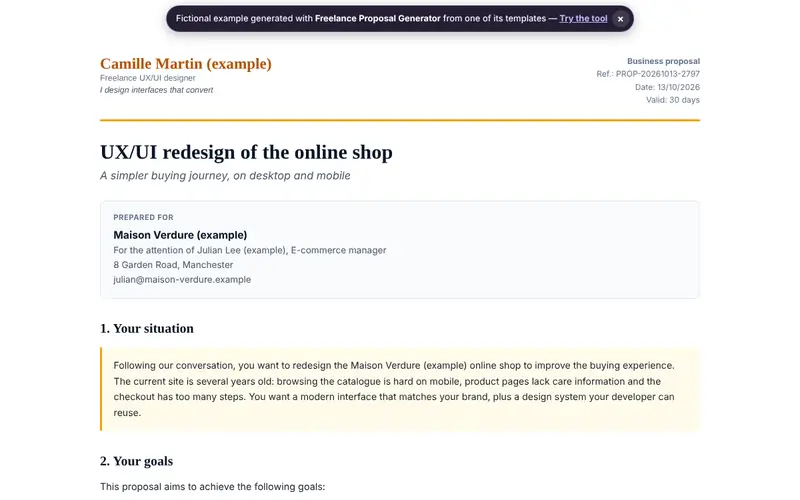
Example generated with Freelance Proposal Generator (fictional data) · See the full example Practical guides: Proposition commerciale : la structure qui fait signer (in French) · Combien facturer en freelance : méthodes de calcul et repères (in French)
-
Contracts & Terms StudioAdvanced
Step 4: Frame the project with a clear contract
- You get
- A service contract or terms of sale adapted to Belgium or France, clause by clause and explained, with checks on mandatory information and on consistency between price, deposit and deadlines.
- You enter
- Your country, the type of client (business or consumer), the project, the price, the deposit, the deadlines and which rights to your work you transfer.
See an example User guide Try the tool →
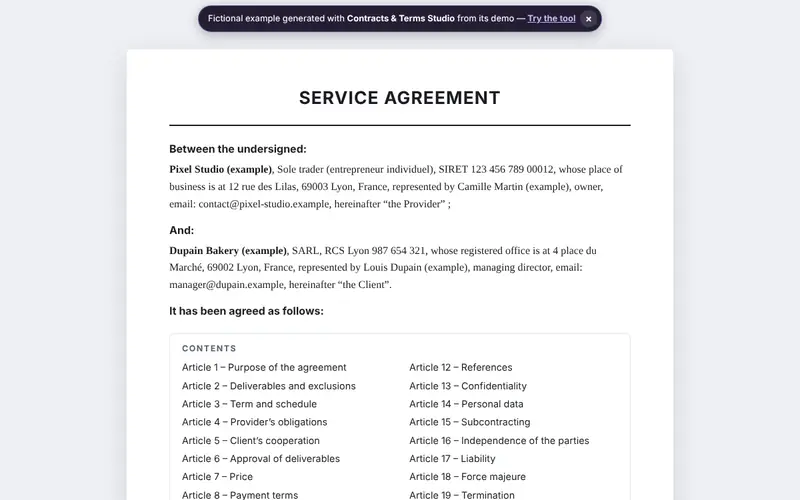
Example generated with Contracts & Terms Studio (fictional data) · See the full example Practical guides: CGV en Belgique : mentions obligatoires en 2026 (in French) · CGV en France : mentions obligatoires en 2026 (in French)
-
CRM StudioStandard
Step 5: Follow every deal through to signature
- You get
- A column pipeline with a dated next action for every deal, the list of overdue follow-ups, deals going quiet and your monthly revenue forecast.
- You enter
- Your current deals (contact, amount, stage, next action), by hand or by importing a CSV file.
What can you do for free before buying?
Every tool opens straight away, with no account or credit card. What you can do for free depends on its level:
-
Client Finder Studio Essential
The whole tool and all its exports (with a small “Made with Yok-Kod” mention), demo, 5-axis score and 3 recommendations, 1 project; Pro removes the mention and adds AI, templates, more projects and every recommendation.
Try it free → -
Outreach Studio Standard
The whole editor, preview, demo, 5-axis score and 3 recommendations, 1 project, exports with a “Discovery version” watermark; Pro removes the watermark and adds AI, templates, data import / export and more projects.
Try it free → -
Freelance Proposal Generator Standard
The whole editor, preview, demo, 5-axis score and 3 recommendations, 1 project, exports with a “Discovery version” watermark; Pro removes the watermark and adds AI, templates, data import / export and more projects.
Try it free → -
Contracts & Terms Studio Advanced
The whole editor, demo, 5-axis score and 3 recommendations, 1 project, preview of about a third of the document; Pro unlocks the full document, exports, templates, AI and more projects.
Try it free → -
CRM Studio Standard
The whole editor, preview, demo, 5-axis score and 3 recommendations, 1 project, exports with a “Discovery version” watermark; Pro removes the watermark and adds AI, templates, data import / export and more projects.
Try it free →
Good to know: prospecting, quotes and terms of sale
Prospecting: the rule depends on the channel and the person
A marketing email to a consumer requires their prior consent. To a professional, France allows it if the message relates to their job, whereas Belgium in principle requires consent, except for generic company addresses. By phone, France has required the consumer's prior consent since 11 August 2026; Belgium uses the “Do Not Call Me” list.
Read: Prospection : ce qui est autorisé par email, téléphone et LinkedIn (in French)
A signed quote is a contract
An accepted proposal binds both parties: spell out what is included and what is not, and state a validity period, your payment terms and your company number (BCE in Belgium, SIREN in France).
Read: Proposition commerciale : la structure qui fait signer (in French) · Combien facturer en freelance : méthodes de calcul et repères (in French)
Terms of sale: mandatory or not, depending on the country
In Belgium, terms of sale are not mandatory but pre-contractual information is. In France, they must appear on your website if you sell online to consumers, and be provided to any business that asks for them.
Read: CGV en Belgique : mentions obligatoires en 2026 (in French) · CGV en France : mentions obligatoires en 2026 (in French)
General information, up to date on the date of this page; it does not replace professional advice.
What the Freelance Kit does not do
- It does not replace an accountant, a lawyer or a notary: the documents you produce are solid working drafts, to be reviewed and validated when the stakes call for it.
- It does not force AI on you: the tools work without it. AI is optional, with your own key from the provider of your choice, who bills you directly.
- It does not send your messages for you or provide contact lists: you stay in control of who you contact and when.
- It does not guarantee you will sign clients: it helps you prospect methodically, present a clear offer and never miss a follow-up.
Frequently asked questions about the Freelance Kit
Yes. Contracts & Terms Studio adapts the contract to the country you choose (late payment penalties, mediation, governing law, courts), Freelance Proposal Generator handles Belgian and French VAT, VAT exemption and reverse charge, and Outreach Studio checks your messages against each country's rules (prior consent, the Belgian “Do Not Call Me” list).
Yes. Under our terms of sale (in French), every one-time payment is refunded in full on simple request sent within 30 days of purchase, with no reason needed. The refund goes back to the payment method you used and ends Pro access to the Freelance Kit tools. The 14-day legal right of withdrawal does not apply once you have asked for immediate access to the digital content: you give that consent when you pay, and the 30-day guarantee still applies.
No. What you already paid for tools included in the kit is automatically deducted from its price (up to 70% of the kit price); the exact amount is shown before payment. If you already have access to every tool in the kit, through a pack or Full Access for example, the purchase is blocked: there is nothing to pay. And if you later move to Full Access, which include all the kit's tools, what you paid for the kit is deducted in the same way.
In your own browser. Our servers do the calculations but don't keep the content of your projects: your proposals, forecasts or pages stay on this device, in this browser. No advertising trackers.
No. No setup: the engine works straight away. AI is optional — without it, your documents are still generated. Every tool in the kit uses Yok-Kod's rules and calculation engine. In the Pro version, if you want it, you plug in the provider of your choice (Agnes, OpenAI, Anthropic Claude, Mistral, Groq, Google Gemini, DeepSeek, OpenRouter and any OpenAI-compatible service) with your own key, which stays in your browser, is only sent at the moment of an AI request and is never stored. The provider bills you directly. Our AI key guide explains how to get one.
Yes. Payment is handled by Stripe, which issues an invoice automatically for the €59 (VAT included). You can enter your company VAT number during checkout, and download your invoices at any time from your account, through Stripe's secure portal.
Ready to sign your next client?
Start for free with your acquisition plan, then unlock all 5 tools when you want to go further.
€59 once, for life · €133 separately
Refunded within 30 days Secure payment by Stripe
Try and buy without an accountData stays in your browserBelgian company (BCE 0508 794 296)
Page updated on .